Dream Note
A downloadable tool
Do you lack focus (like myself)? Does organizing your notes feel like a chore? Do you wish there was a local alternative to something like Trello, or do you wish Trello didn't have as many limitations?
Dream Note is a lightweight project organizer made specifically with game development in mind.
I made Dream Note because I wanted something simple that I could leave open while working on a game. Somewhere I could dump ideas, organize tasks, attach reference files, and quickly jump to the parts of the project I actually need.
No account, no subscription, no browser tab.
Organize your projects
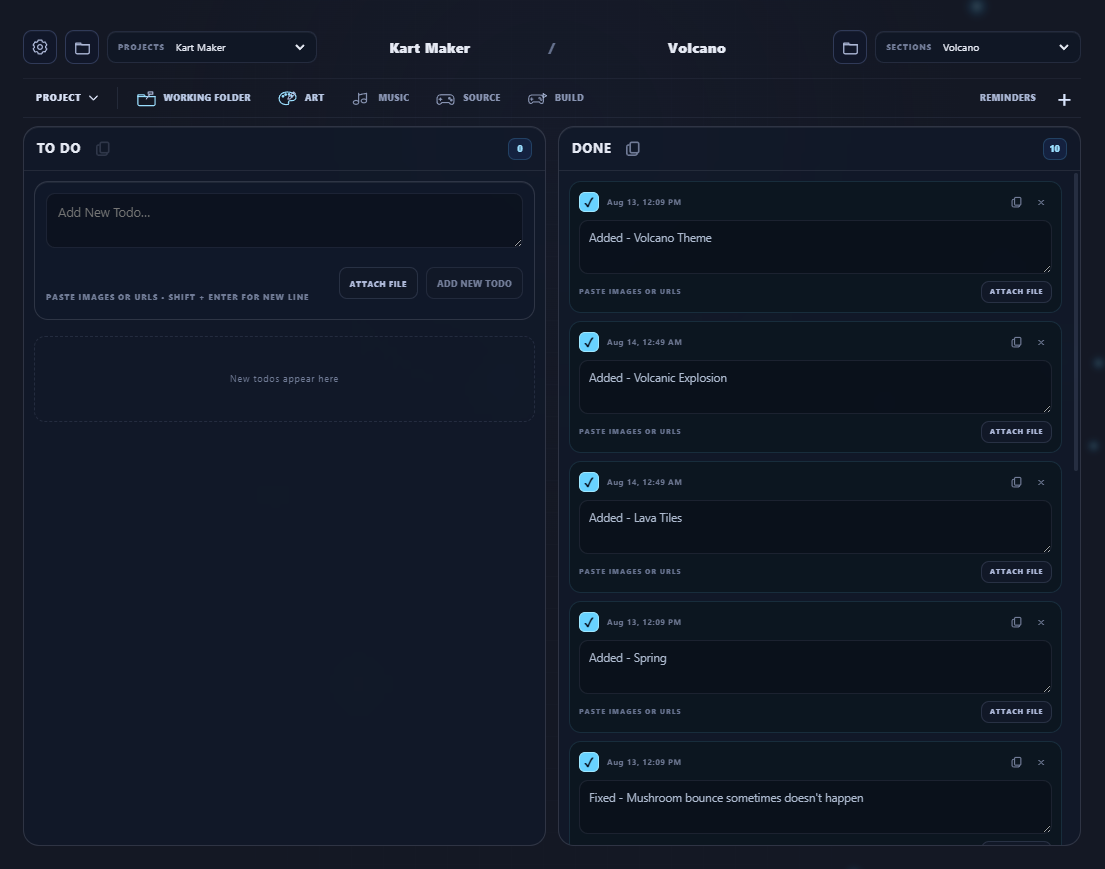
Dream Note lets you create multiple projects and split them into sections however you want.
For example:
- Programming
- Art
- Music
- Bugs
- Level Design
- Ideas
- Stuff I should probably fix eventually
Each section has its own To Do and Done lists, and todos can have files attached to them for screenshots, references, documents, audio, mockups, or anything else related to the task.
Made for game development
You can set paths for your:
- Working Folder
- Art Folder
- Audio Folder
- Source Folder
- Build / Game Executable
Once they're set, you can open them directly from Dream Note.
Need to edit a sprite? Open your Art folder.
Need to work on the game? Open your Source folder.
Want to test it? Launch the build directly from Dream Note.
It's a small convenience, but when you're constantly jumping between assets, source files, notes, and builds, it makes the workflow a lot smoother.
Keep everything local
Dream Note is a local desktop application.
Your notes and projects stay on your computer, and you don't need an internet connection or an account just to manage your own work.
I wanted something I could use like Trello without needing Trello.
Features
- Multiple projects
- Multiple sections per project
- To Do and Done lists
- File attachments
- Drag-and-drop task organization
- Notes and text editing
- Quick access to Working, Art, Audio, and Source folders
- Launch your game directly from Dream Note
- Local project storage
- Built around game development
- Lightweight desktop workflow
- Set reminders for events or due dates
Why I made it
Most of the time, I don't need a giant project management suite.
I need to remember that the boss animation is broken.
I need somewhere to put the screenshot showing how it's broken.
I need to remember that I still haven't made the sound effect.
And I need a list of the other 20 things I started doing while I was supposed to be fixing the boss animation.
That's Dream Note.
It's meant for individual developers and small projects that need organization without turning organization itself into another job.
Demo
A free Dream Note Demo is available if you want to try it first.
The demo lets you test the interface and workflow, but does not save your notes between sessions.
If you're the kind of developer who has five text files, three Notepad windows, a folder called IMPORTANT, and a Trello board you haven't opened in six months, you might get some use out of Dream Note.
Purchase
In order to download this tool you must purchase it at or above the minimum price of $4.96 USD. You will get access to the following files when they are released:
Download demo
Comments
Log in with itch.io to leave a comment.
awesome tool loving it so far.one feature that will be useful to add is help documentation fused in already in the product that breaks down each section does so a beginner learns using the program. as some it will be first time using the tool.love that it is offline.
very true - that’s a good suggestion. 👀
just test found one part that would need adjusting they way its designed enter button since we already have the add note button doesn't take me to second line when pressed but adds note .eg cant type
"ENEMY 01
-fix the attacking pattern increase windup"
meaning would need to unnecessary space provided what am typing has more than 1 line that are not connected so best let enter act us moving to next line like how almost all default text editors work just like you have implemented it to work once note added when editing note or you intentionally design type title what to do then editing it after breakdown ?